
🎮 Mario Power Tennis
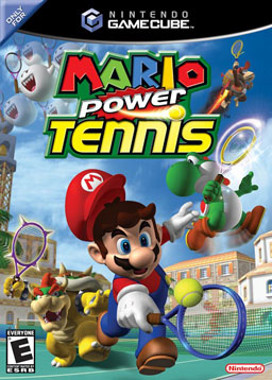
Mario Power Tennis
Nintendo GameCube · Native play via Dolphin
1. Download KhoGameHub PC Launcher (once)
2. Run it (next → next → finish)
3. Click Play on PC — game launches automatically
4. Requires Dolphin Emulator to be installed


Open Related Rooms
Finding any related Room...
Description
Mario Power Tennis brings the beloved Mario franchise to the tennis court in an exciting blend of sports and fun. Players can choose from a roster of iconic characters, each with unique abilities and special moves, adding a strategic layer to the fast-paced matches. The game features vibrant courts, power-ups, and challenging opponents, making each game a thrilling experience. With both singles and doubles modes, players can enjoy competitive multiplayer local matches or go solo against the AI. Mario Power Tennis is a nostalgic trip for fans of the series and sports gaming alike.
Tags: sports multiplayer local fast-paced arcade classic🟣 GameCube Play Guide
- Install KhoGameHub Launcher (once only) and Dolphin Emulator — then click Play on PC (Dolphin), the game opens automatically.
- Android: Install the KhoGameHub app → tap Open in App to play directly.
- Controls: Plug in a gamepad (Xbox/DualShock both work), Dolphin detects it automatically. Switch controller type using the toggle button on the page.
💾 Saving
Dolphin uses a virtual memory card, saving automatically per-game like a real GC. Save state: F1–F8 (save slot) / Shift+F1–F8 (load slot).
⚙️ Dolphin Settings
- Graphics → Backend: Select Vulkan (best) or Direct3D 12/11 if Vulkan fails.
- Internal Resolution: 2x Native (1080p) or 3x for 1440p/4K displays — much sharper than native GC.
- Anti-Aliasing: MSAA 2x or 4x to remove jagged edges.
- Anisotropic Filtering: 4x or 16x for smoother distant textures.
- Widescreen Hack: Graphics → Enhancements → Widescreen Hack → enable for 16:9 (some games may show artifacts).
- Shader Compilation: First run may stutter — this is normal, Dolphin is building a shader cache. Subsequent runs will be smooth.
🎮 Controller Setup
Controllers → Port 1 → Standard Controller → Configure. For DualShock/DualSense: enable SDL as backend for full button support. Analog triggers (L/R) need correct axis mapping.
🖥️ Hardware Requirements — Dolphin
⚠️ Dolphin is the heaviest emulator of the four — GC/Wii uses high-speed PowerPC CPU, requiring strong IPC. More cores help less than high single-thread clock speed.
| Component | ⚠️ Minimum (1x native) | ✅ Recommended (2x–3x upscale) |
|---|---|---|
| 🪟 Windows / 🐧 Linux | ||
| CPU | Any 64-bit x86-64 / AArch64 (4+ cores) | 4+ cores · higher clock speed = better |
| RAM | 2 GB | 4 GB+ |
| GPU | Direct3D 11.1 / OpenGL 4.4 / Vulkan 1.1 (onboard OK) | Dedicated GPU · Vulkan 1.1 preferred |
| OS | Windows 10 1903 64-bit / Linux / macOS 11+ | Windows 10/11 64-bit (latest) / Ubuntu 22.04+ |
| 🤖 Android | ||
| SoC | 64-bit AArch64 · Android 5.0+ · OpenGL ES 3.0+ | Snapdragon 700+ · Android 9+ · Vulkan 1.1 |
| RAM | 3 GB · Android 5.0+ | 4-6 GB · Android 9+ |
* Dolphin is significantly heavier than PCSX2. Games like F-Zero GX and Metroid Prime demand strong CPUs. First-run shader stuttering is normal — smooth after cache is built.

Comments(0)